Introduction
Recently I was asked by a friend to help demonstrate some functionality in a proof of concept. The idea was to make an API endpoint that could check the name of an individual against a pre-loaded list. Commercial applications for this kind of thing are nearly endless but in general its a way of assessing if someone has the potential to be a “bad customer”, be that poor credit history, criminal record checks, embargos and so on.
Conceptually this isn’t a very interesting topic to write an article about, spin up an api – show it could work – job done. But I wanted to incorporate some Dev-Ops stuff into this to not just show how code could generate the API but how we could also use code to deploy the infrastructure in the cloud and automate the build and deploy process.
Steps to be Undertaken
the following steps need to be taken to create this api;
- Build the Necessary Infrastructure in the cloud
- Deploy the required infrastructure
- Code the logic to be used in the API
- Build and Deploy the API logic
Building Infrastructure – Terraform
I want to automate as much as possible the building and monitoring of the infrastructure I want to use here, not only that but as this is a prototype I want the ability to be able to remove / re-create everything I need easily.
Terraform is a great way of achieving this. Terraform is a cloud agnostic infrastructure as code provider. Put simply you tell it what you want your infrastructure to look like and it will manage it for you.
The keyword here is manage – this isn’t a script to create resources, in Terraform you define a blueprint of what you want your infrastructure to be and Terraform will decide on the necessary actions to bring it in line with your blueprint – be that updating existing infrastructure, deleting infrastructure you no longer require or adding new infrastructure.
Terraform works by maintaining a set of “State” files that tell it what the current state of the infrastructure managed by terraform is, it then compares these to the “blueprints” you write and deletes, updates or deploys accordingly.
I know in this proof of concept I will need the following;
- A resource group in Azure
- Storage Accounts / Containers
- A Service Place for the API
- An Azure function to host the API
Therefore my initial task is to write Terraform “Blueprints” for this.
Coding Terraform
in my repo I have created an infrastructure folder, this will contain the Terraform files I need. In general there will always be the following terraform files in each module you create;
- Main.tf – the entry point of terraform
- backend.tf – the configuration of the backend (where the state files will be stored (usually a shared storage account))
- providers.tf – the providers terraform will be using (providers are in effect connection strings to be able to create various resources, in this case we are just using the Azure provider – but we could use Databricks, AWS etc..)
- variables.tf – a file in which variables are defined
- terraform.tfvars – a file in which variables are set
Lets look at some examples of the Terraform configuration in the Main.tf file;
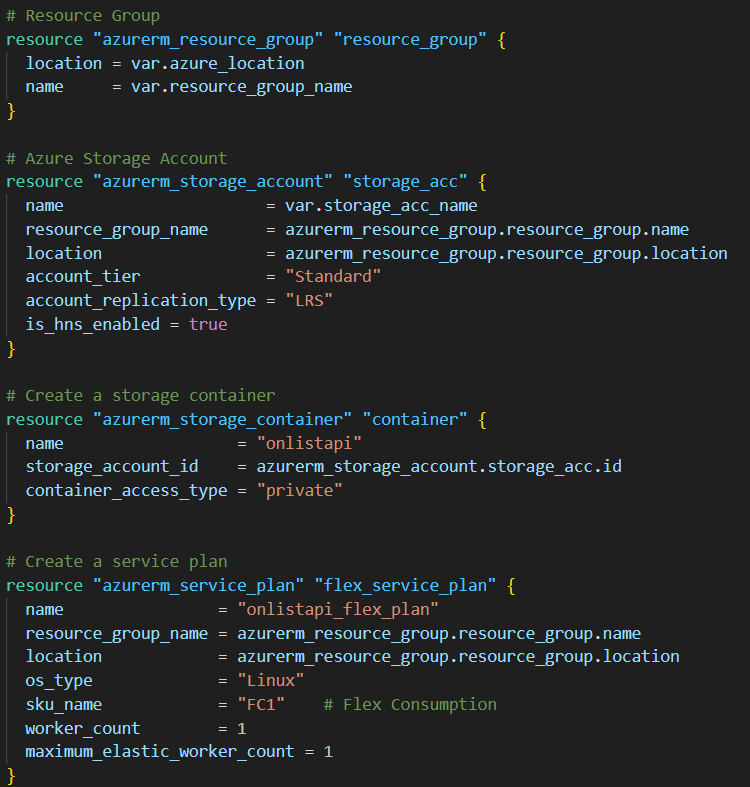
Here you can see the definition of the infrastructure we will need. Using the Azure provider – I have the ability to create azure resources. you can see initially I create a resource group that has the name and location of a variable that will be passed to the job.
I then create a storage account within this resource group (notice how you can reference the resource group name, location id etc.. ) of an object terraform is managing. A container is then made in this storage account and an Linux hosted app service plan is made in the resource group.
The last resource to be created is the Azure function itself – we will write this in Python and these runtimes can be defined in terraform;
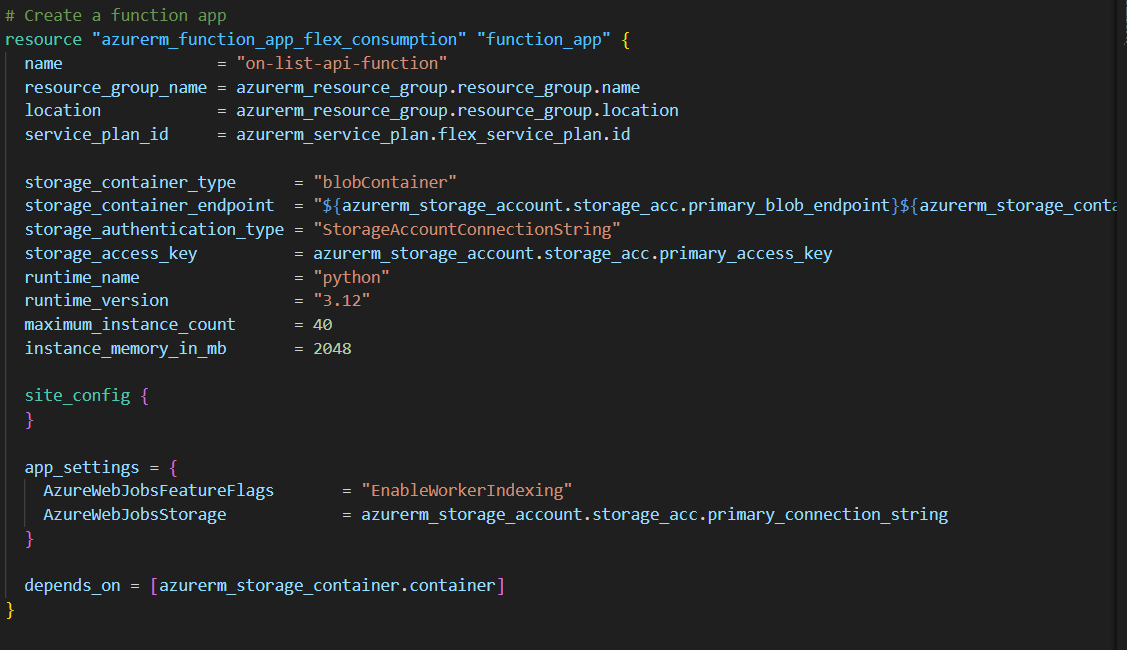
n effect we have designed the infrastructure we want – we now need terraform to be told to connect to an azure subscription and manage this for us.
Terraform works with a series of commands;
- Init (initialises the state files, libraries etc..)
- Plan – Creates a plan of what changes Terraform thinks are necessary to bring your environment in line with the blueprints (note: it only cares about items it is manging – Terraform ignores things that exist but have not being managed by it).
- Apply – applies the generated plan – physically makes the suggested changes
- Destroy – not used in a regular execution – but with terraform you have the ability to make it destroy every resource it is manging, very handy while developing.
Its also worth noting that terraform tasks will often require elevated privileges in cloud environments (Azure in this case), Terraform can perform a huge amount of tasks and the account it will run under (a service account or managed identity) will often need elevated permissions to be able to perform these tasks. For example things like Adding users into particular AD groups that terraform has made, or adding secrets into an azure key vault will need relevant permissions.
Terraform also requires the initial setup task of somewhere to write its state files. In this case I created a separate resource group and storage account manually – and have pointed by Terraform configuration to that in the backend.tf file;
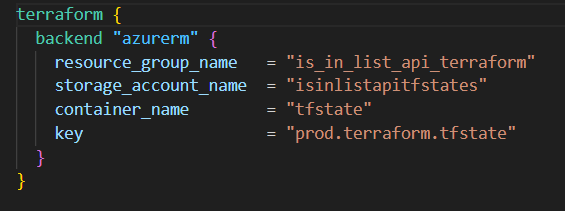
values in this file must be static strings – you cannot use variables in the backend config. This is pointing to a container named tfstate in a storage account named isinlistapitfstates.
At this point – with the variables we want to use declared and set – we are in a position to run terraform, while we could possibly do this locally – a dev ops pipeline is a more robust approach.
Dev Ops Pipeline – Build Infrastructure
In Azure Dev Ops I have set up a Service Connection sp_is_in_list. This is linked to an app registration I have made in Azure Entra (Active Directory) – this is the account that will deploy the infrastructure, relevant permissions have being assigned to this account to allow them to be able to create / update the resources required.
A Yaml Pipeline is then written to perform the following steps;
- Checkout the code from the Repo
- Install Terraform
- Obtain required secrets from Azure Key vault
- Run Terraform Init
- Run Terraform Plan
- Run Terraform Apply
A snippet of this pipeline is shown below;
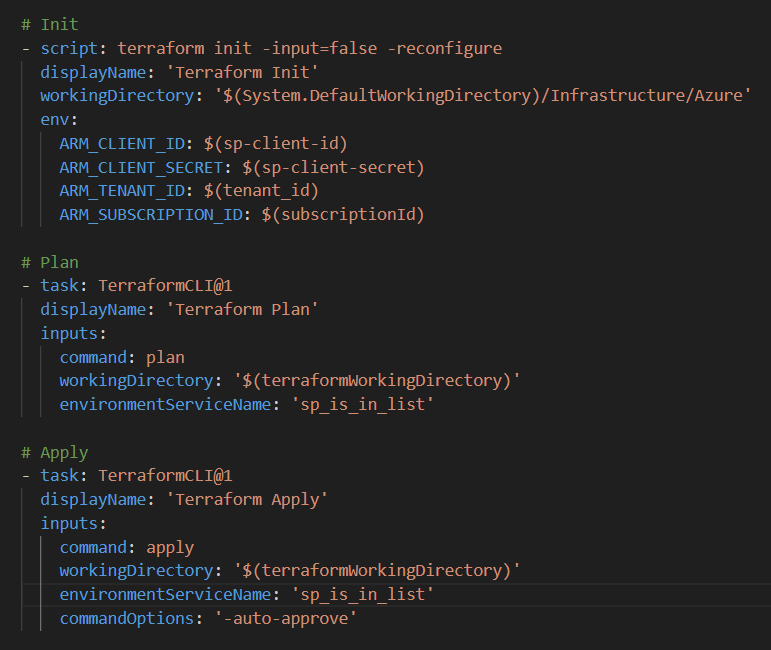
If we execute this pipeline on an Azure location where these resources do not currently exist – Terraform will evaluate they are not there and plan to make them. We can see this in a pipeline execution;
Here you can see the stages of our pipeline being executed – and observe the plan terraform has to create our resources;
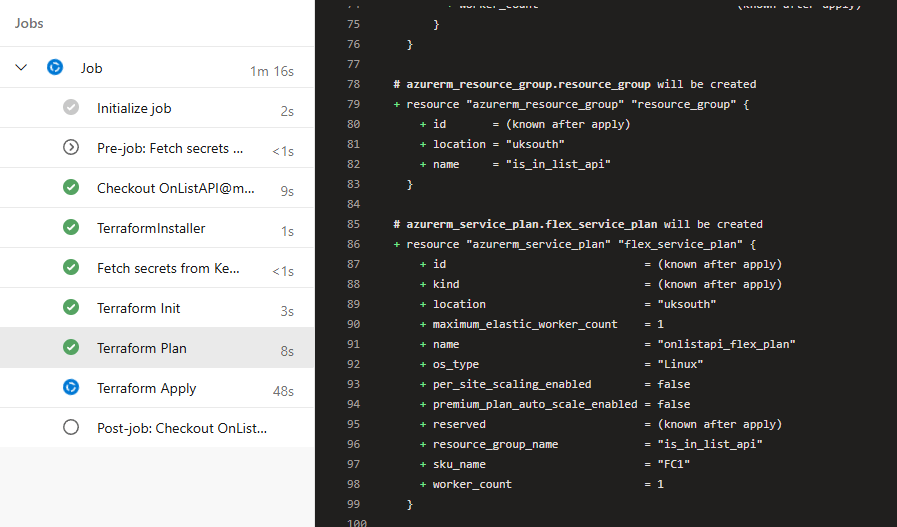
If we were to run this pipeline again – the terraform plan would be empty. This is because our infrastructure matches the blueprint we want, this is an important concept to understand, this isn’t a script, terraform is managing our blueprint vs our actual infrastructure.
Coding the API – Azure Functions
Now we have our infrastructure we need to code an API, I am going to use Azure functions for this. These functions are lightweight microservices that are run in a serverless state in the cloud, perfect for proof of concepts.
As mentioned earlier when defining the Terraform code I am going to write the logic in Python, Azure functions support a few different languages including dotnet, PowerShell, python and JavaScript. I’ve just written a fair bit of Python recently so feel more familiar with that right now.
So what will this API do…. I think the following tasks are required;
- It will receive a message with a list of names – lets call these customers
- It will have loaded into memory a list of “bad guys”
- There will be some matching engine to compare the customers to the bad guy list (perhaps with an element of fuzziness)
- A reply will be made to the sender detailing any matches that are made.
Firstly we need to make an entry point and annotate the code so that the azure function knows this is our api endpoint – I created a new file called function_app.py, in here we mark the App – auth level and routes;

This is how the azure function recognises this as our endpoint and how we will handle authorisation (yeah.. I will do this should anything come out of this work!)
Now we need to set up a list of bad guys – I will just hard code something as a pandas dataframe for now, but this dataframe could ask as an interface coming from anywhere really (a file, a database, even another web service). I will make this in a new file named dataframe_loader.py;
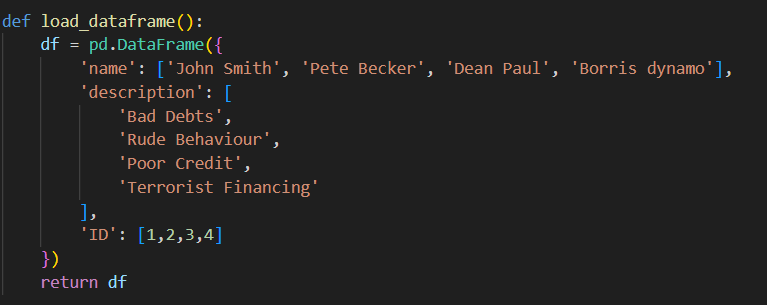
so as you can see we have a list of names, a description and an unique ID for each of them.
Now that we have a list of “bad guys” we need to have our list of names to check – the “customer names” received via the HTTP Post to our endpoint. I assume I will be passed a list of names in the Json body. Therefore in function_app.py I can do this;
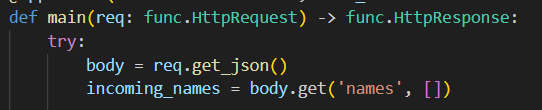
giving me a collection of names with the name incoming_names. (said name quite a few times in that sentence!)
now that I have my 2 lists to check against each other – we need to consider the matching engine. I made a new python file named matching_engine.py;
This class will consist of a series of matching rule based around the two lists of names – each matching rule will have access to the “bad guy” list and will be given a customer name.
We also can do some initial prep here – removing common strip words that are input;
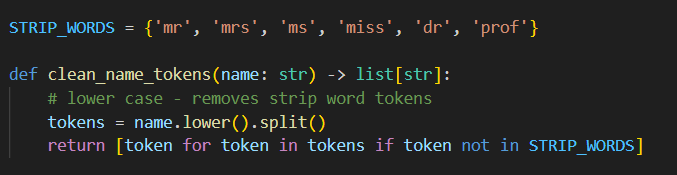
and then we could apply a rule – for example an exact match;
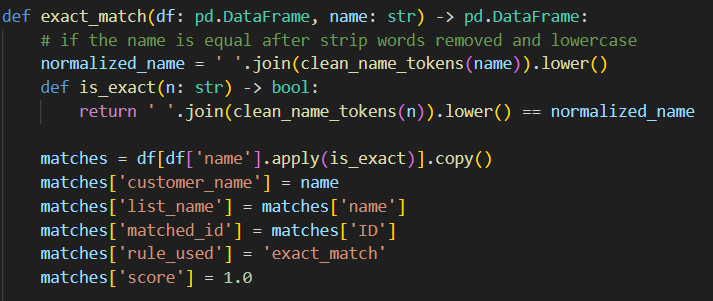
Here you can see an output interface defined as well – every match rule function will return a data frame consisting of customer name, list name, matched id, the rule used and a score.
we then will have a method which will use these rules and apply them;
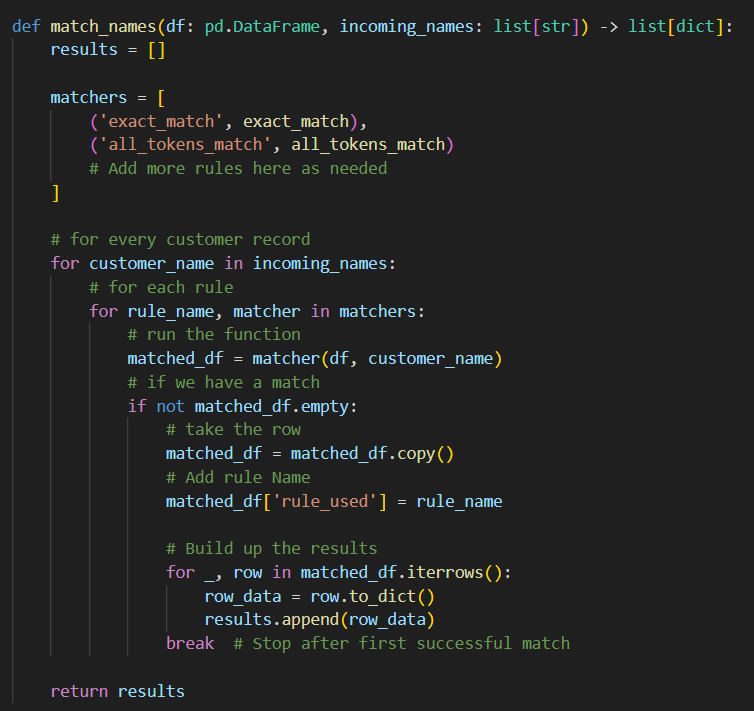
This method will remain constant no matter how many “match rules” are defined, they will simply be added to the matchers collection.
We are looping through ever customer record, applying every rule if they match we take the row and the rule used and append it to a results list of dictionaries. Currently we break on the initial match for efficiency – however that may later be revisited.
Now we have the actual logic of the API – we just need to write it into the main method. Giving us this;
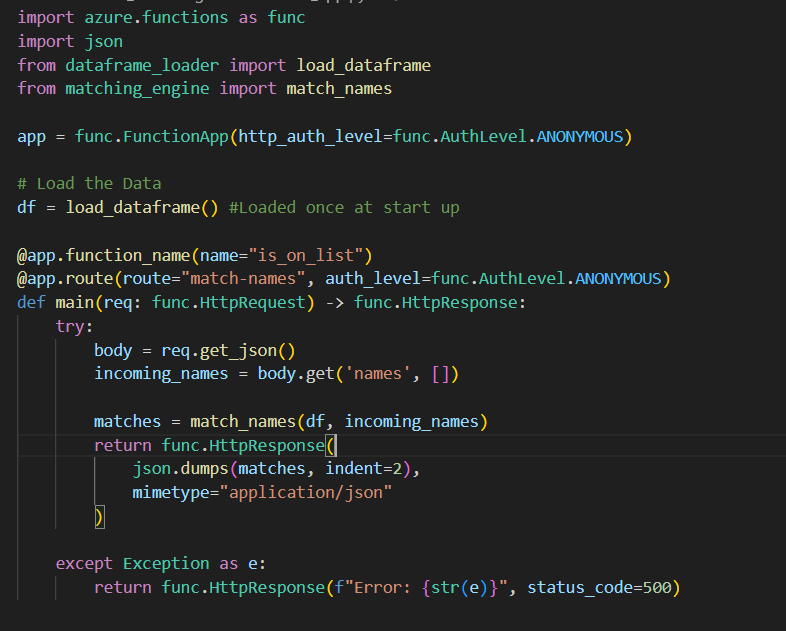
We load the “bad guy” list on start up into memory – we could periodically schedule a refresh where we swap out the list for a more current one and restart the service as required.
We then get the list of customers sent in the request – get the matches from the match engine and reply with a Json message of the matches.
Dev Ops Pipeline – Build and Deploy the API
At this point we have our API project setup, but we want to have a dev ops pipeline to package and deploy this. In python (unlike dotnet) there isn’t a true “build” process. The tasks we need to achieve are;
- Install Dependencies
- Create a Zip file of the release files (no debug, no local settings, no terraform etc..)
- Deploy this zip file to the Azure function terraform built for us
This is all done in a Yaml pipeline – i handpick the files for the zip file which are our python files (the app logic), host.json and requirements.txt (necessary config).
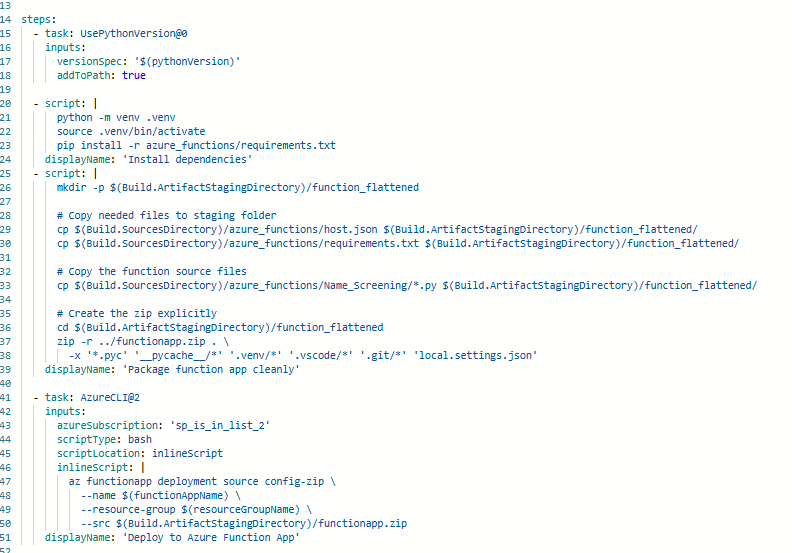
Upon running this pipeline successfully;
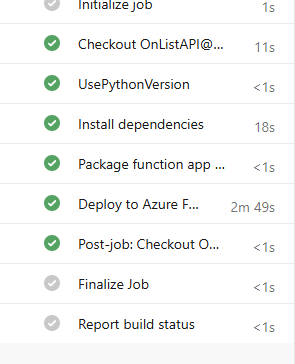
Our API should be live – lets check it via postman;
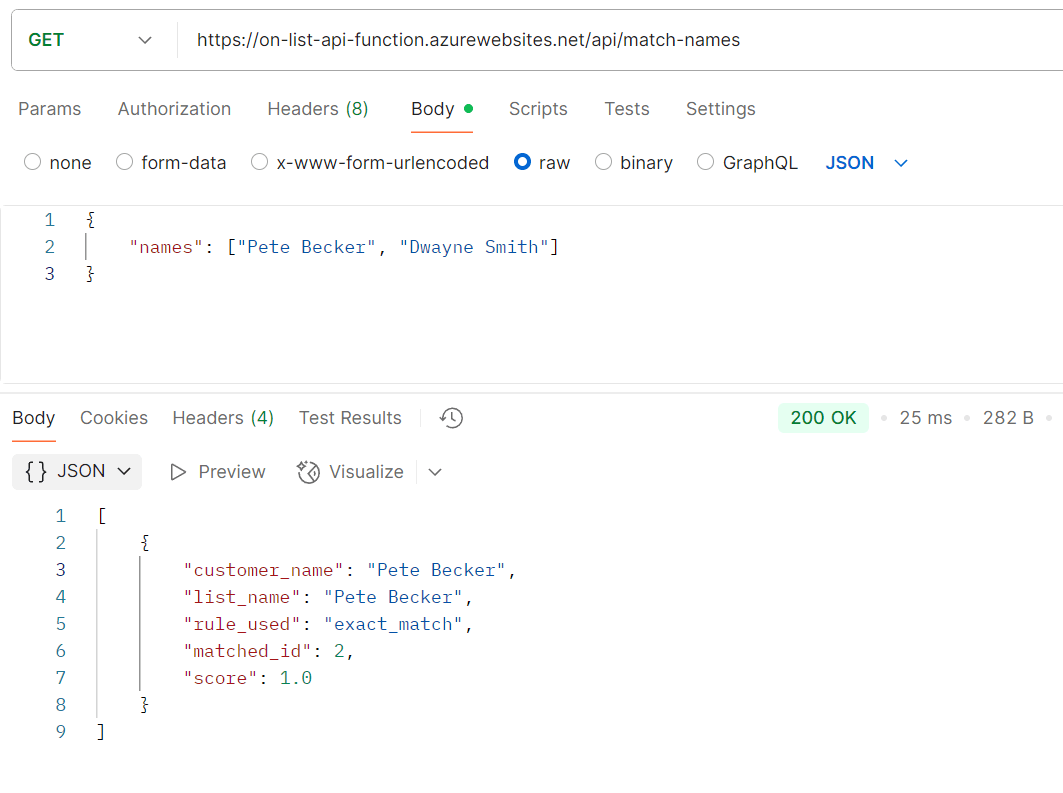
Here you can see – the “customer” names of Pete Becker and Dwayne smith are passed to our azure functions endpoint hosted after our deployment.
We generate an exact match on Pete Becker within 25 milliseconds. Our Pipelines and code seem to have worked as expected.
Conclusion – What’s Next
Firstly lets think about what was actually done here (within one day of development) – using Infrastructure as code and a cloud provider – we have built storage, hosting and application infrastructure. We have developed code and deployed that automatically to said infrastructure in a re-useable fashion. This is no trivial thing – I remember the pre-cloud days of provisioning servers and such and this would have taken a large amount of time to plan within an IT department!
That being said, the counter argument is this is a very simple throw away proof of concept, and i’d agree with that. A number of bigger issues need to be considered for this to reach a prototype worth considering as viable.
Supporting services in Azure
In reality if this was a genuine product, you’d want to use Log Analytics and API management features within azure to monitor the API and highlight issues.
Authentication
There is currently no authentication in the API – you’d want to consider how you recognise genuine requests (api key, Oauth2 etc..)
Performance
This is the big question, if these lists are big (tens of thousands, hundreds of thousands) this approach will not scale well. In effect you could easily make millions of comparisons imagine the following
1 Customer Name, 10 match rules 10,000 people on the Bad Guy List. Results in 100,000 comparisons if there is no match (ever bad guy checked) 10 customers is a million comparisons… and so on.
A strategy would need to be thought up to improve this – some kind of blocking whereby only those records which have “a chance” to match are compared to each other. This would need some kinda of algorithm to assign a group to a name both on the customer and list side that is looser than the match rules – and compare only within those subsets.
For Example;
Zach Goldberg is substantially different to James Smith, but Zach Goldsmith isn’t – you would consider Zach Goldberg and Zac Goldsmith as possible candidates but James smith would exist in another “block”. Significant work would need to be done on this area to check its viability.
That being said – its very easy to think about what needs to be done and not what has being done in a very small space of time. Another nice thing about all this is at 6pm as it is now I can run my final pipeline – Terraform Destroy;
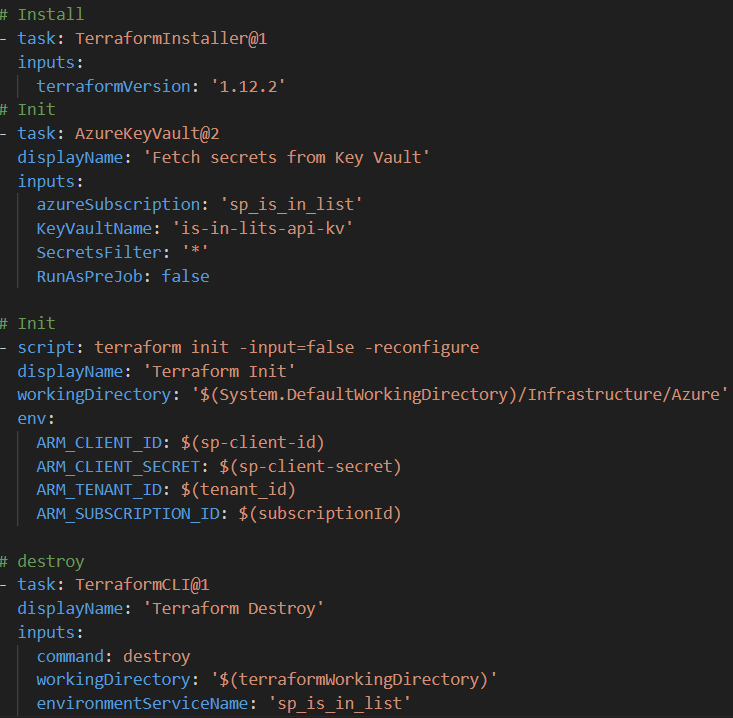
and remove everything I made today from my Azure Account – It can be rebuilt in advance of the next meeting my friend and I have on this, this ability to spin up and destroy resources on demand really shows the power of cloud computing for prototyping such as this.